How does SeniorMatch photo verification work?
You record a selfie video of 3 to 8 seconds and SeniorMatch checks that your face matches your profile photos, typically within one working day. Every member has had to do it since 14 April 2025.
On this page 6 sections
The steps
SeniorMatch’s help answer dated 2 February 2025 gives them: click Verifications beneath your profile photo, select Main Photo, and click Verify by Selfie Video. Then follow the prompts on screen.
What “verify” means is in a separate answer, dated 25 February 2026: “proving your identity by uploading a selfie video (3-8 seconds).”
The review compares two things. In SeniorMatch’s words, “We will review to ensure your selfie matches the person in your profile photos, and your verification will be confirmed or rejected within 24 hours.” A later answer, dated 20 September 2026, says the process “typically takes one working day”.
One warning before you start. The capture uses coloured lights, and the help page says to be cautious if you are photosensitive.
If it is rejected
The answer dated 28 May 2026 lists what to check, and most of it is about the picture:
- Have a clear photo of your face on the profile.
- Be the same person in the video as in the photos.
- Move the camera so your head fits in the circle.
- Make sure your whole face is visible and well lit.
- Give the browser or app permission to use the camera.
- Check the internet connection and try again.
If it keeps failing, SeniorMatch asks for a screenshot of the error and a short description, sent to its support address.
What the badge proves
One thing. SeniorMatch’s answer dated 17 September 2026 says photo verification “helps confirm that the person using an account matches the photos submitted for verification.”
The same answer lists what it leaves out: verification “does not confirm a member’s income, occupation, relationship intentions, medical information, criminal history, or the accuracy of every statement in their profile.”
The service agreement goes further under a heading in capitals, “NO CRIMINAL BACKGROUND SCREENING”. A verified badge tells you the photos are of the person holding the phone. Who that person is remains yours to find out. Our safety guide covers how.
How you can lose it
By tidying up. The May 2026 answer includes this line: “Your photo verification will be canceled if you delete all public photos.” Keep at least one public photo in place while you swap the others.
The other verifications
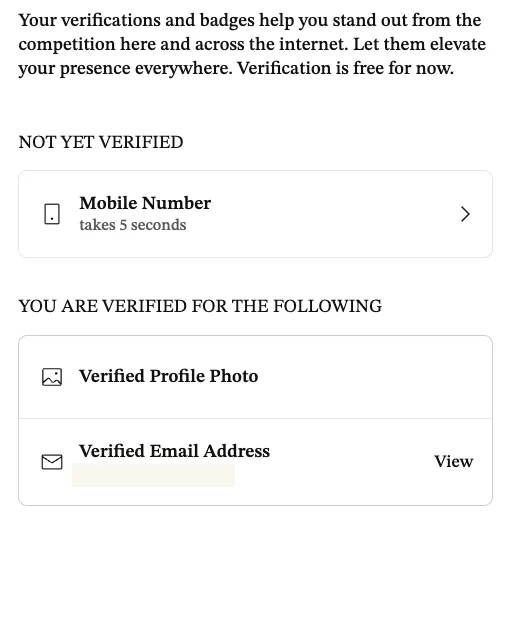
The verification page lists more than the photo. On 12 November 2026 ours showed a verified profile photo and a verified email address, with the mobile number still open as a step that “takes 5 seconds”. The page’s heading note read “Verification is quick, easy, and currently free.” In September the wording was “free for now”.
When it became compulsory
On 14 April 2025. We can date it because the notice is still in our account’s inbox: a message from support headed “Coming Soon: Photo Verification Required Starting April 14, 2025”.
Related questions
Can I use SeniorMatch without verification?
Photo verification has been required of all members since 14 April 2025. We have not tested what an unverified account is allowed to do.
Can anyone see my SeniorMatch verification video?
No. SeniorMatch's help answer dated 30 March 2026 says the verification photo is confidential and cannot be viewed or accessed by anyone, including yourself, after submission.
Look at your own area before you pay
A free account shows you who is in your state. Premium is $33.99 for one month if what you see is worth writing to.
Start with a free profileFree to join. We earn a commission when you register through our links; it does not change your price. The Premium membership on our test account was provided for this review, not purchased. Full disclosure
Skip it if you need distance search on day one, or if you know you will not turn off auto-renewal.
- Build a profile and add photos
- Search by country and state
- Send 40 winks a day after the first three days
- Reply when a Premium member writes first
- No card needed to register