Checked 16 September 2026
How much does SeniorMatch cost per month? 2026 plans, renewal, refunds
SeniorMatch charges $33.99 for one month, $69.99 for three months or $109.99 for six, read at checkout inside the account on 16 September 2026. Whichever length you pick renews on its own at the same price until you switch that off, and the service agreement gives you 3 business days from the moment you subscribe to cancel and get the money back. After those days the fee is not refundable. Where you cancel depends on where you paid, and a card charge on the website, an iPhone purchase and a Google Play purchase each stop in a different place.

On this page 13 sections
The three plans
On 16 September 2026 the plan screen inside the account offered three lengths, and SeniorMatch's public pricing page and its public cost page carried the same three figures the same day.
| 1 month | $33.99 total shown as "$8.50 / week, billed as USD $33.99 every month" |
|---|---|
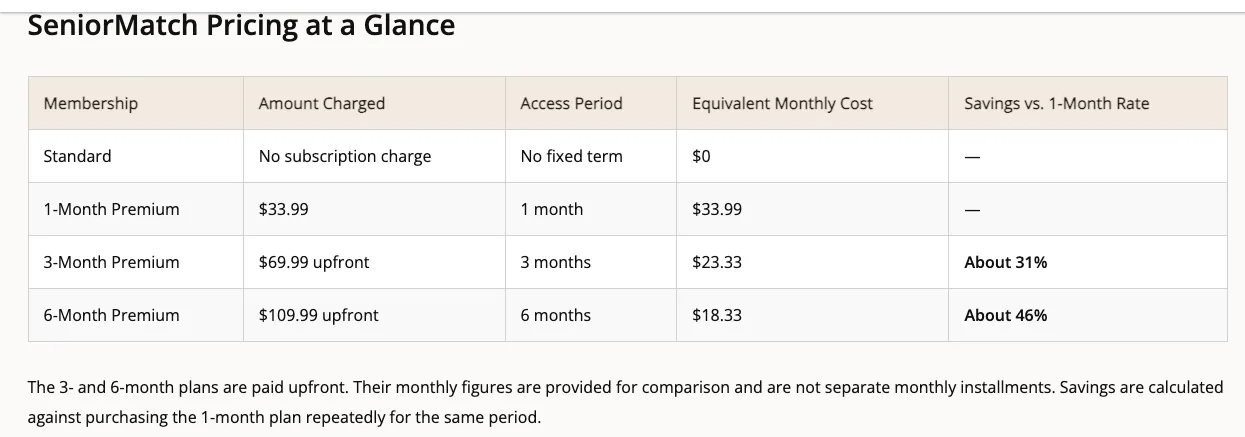
| 3 months | $69.99 charged once about $23.33 a month |
| 6 months | $109.99 charged once about $18.33 a month |
| Refund window | 3 business days service agreement, 2026-05-12 |
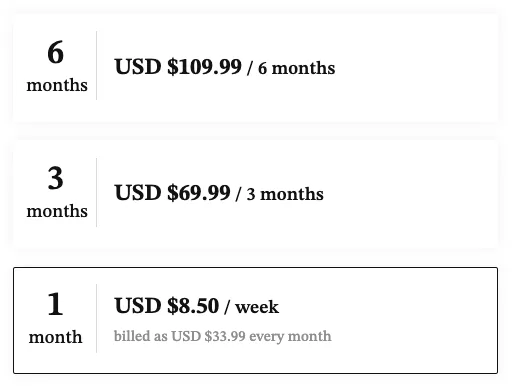
The one month plan is not sold by the week. The screen prints it as "$8.50 / week, billed as USD $33.99 every month", so the figure you are agreeing to is $33.99, taken once a month, for as long as the subscription is alive. The three and six month plans are single payments taken up front; the per month numbers next to them are arithmetic for comparing, not instalments you can stop halfway through.
Six months works out at roughly $18.33 a month, the lowest monthly figure of the three, and it is also the plan with the most money at risk. The refund window is the same 3 business days whichever length you buy, so a six month plan you give up on in week three refunds nothing. It is the right plan only if the free search has already shown you people close enough to meet.
SeniorMatch's public cost page also notes that prices are in US dollars, are consistent across its four platforms, and that taxes may be added at checkout depending on your country or region. So the final screen can read higher than the plan price. Read it before you confirm.
What the price used to be
Eleven days before we read the checkout, the same three plans cost less. On 5 September 2026 they were $29.95, $59.95 and $95.95. On 16 September 2026 they were $33.99, $69.99 and $109.99. The one month plan went up $4.04 in that gap.
| One month | $29.95 then $33.99 up $4.04 |
|---|---|
| Three months | $59.95 then $69.99 |
| Six months | $95.95 then $109.99 |
Public reviews reach further back and name other amounts. What follows is what individual members say they were charged, not a rate card SeniorMatch published: we cannot see which plan each person bought, or whether they paid on the website or through an app store. Every quote is short and unedited, with the date it was posted.
| 25 March 2020 | "I wasted $16.99. What was I thinking? They refused to refund." App Store review, one star |
|---|---|
| 2 July 2020 | "$35 down the drain" App Store review, one star |
| 18 October 2020 | "I also paid $34 for my monthly subscription" App Store review, one star |
| 13 February 2025 | "I had to upgrade to premium for 1 month at $30" Trustpilot review, one star |
Two of those were posted in the same year and name different amounts. The price is whatever the screen says on the day you look, so any figure in a guide written last year, including the figure this page itself carried before 16 September 2026, is history rather than a quote.
The Chairman tier
Above Premium sits a tier called CHAIRMAN. The renewal screen describes it as every Premium privilege plus a Matchmaker and a Secret Admirers Message Concierge, with 55 reserved privileges against Premium's 40. It prints "Limited-Time Offer" and $8.50 a week, and no total price anywhere on the screen.
The button reads APPLY FOR CHAIRMAN rather than opening a checkout, so this is an application rather than a plan you can buy in a minute. The weekly figure is the same one the one month Premium plan shows, but Premium's weekly number turns into $33.99 a month on the next screen and Chairman's turns into nothing. We did not apply, so what Chairman charges is not something this account can show.
Payment methods, and what lands on your statement
The FAQ entry on payment, last updated 23 April 2026, names these: Visa, Mastercard, American Express, debit cards, CCBill, Google Pay, PayPal. The checkout screen inside the account gathered them into four buttons: Credit / Debit Card, PayPal, Google Pay and Other Payment.
The name on your statement depends on which one you use, and this catches people out. Pay by card, check card, Google Pay or PayPal and the charge reads "SeniorMatch". Pay through CCBill and the same FAQ entry says it reads "CCBill.com *SuccessMatch" instead, which is a name most buyers would not recognise on a bank statement. If you are scanning a statement for a charge you want to stop, look for both.
The checkout screen carries its own line about this, printed just above the CONTINUE button: "I understand that SeniorMatch will appear on my credit/debit card statement." That line covers the card route only. It says nothing about the CCBill wording.
The iPhone app prints a different one month price
SeniorMatch's App Store listing, read on 17 September 2026, gives its prices inside the app's own description text: $34.99 for one month, $69.99 for three months and $109.99 for six. The three and six month figures match the website exactly.
The one month figure does not. On the same visit, the purchase flow for that same one month plan showed $33.99, the web price, so the listing text and the thing you actually buy sat $1.00 apart. It is only $1.00, but it is a reminder that a printed price and a charged price are two different numbers. The screen that takes your card is the one to read.
The bigger difference is who ends up holding the subscription. A plan bought inside the iPhone app belongs to Apple, and one bought in the Android app belongs to Google. You cancel it there, not in SeniorMatch's Settings, and SeniorMatch's own FAQ is blunt about what happens if you forget. We read the App Store listing but not the Android in-app price, so we cannot say whether Google Play shows the same gap.
Auto-renewal is on unless you turn it off
Every plan renews by default. The FAQ puts it plainly: "your subscription will be renewed for the same package length at the same price until you cancel it." Six months bought once becomes six months bought again.
Switching auto-renewal off does not cut your access short. The same FAQ entry says that after you turn it off "you can still enjoy the privileges on our site as a premium MEMBER until your premium MEMBERSHIP ends", and you drop back to the free Standard tier afterwards. So the safe move on day one is to buy the plan and immediately turn renewal off. You keep everything you paid for and you stop the second charge.
What you cannot do is press pause. The FAQ says "At present, we do not allow freezing of your premium MEMBERSHIP." There is no holiday setting and no way to bank time you have not used. Cancelling is the only lever.
One thing goes back to zero when Premium lapses. The advanced filter panel carries a line of its own: "Advanced filters reset when your Premium membership expires." The distance search and the marital status filter, including Widowed, go with it.
3 business days, and then nothing
The refund rule lives in the End User Service Agreement, last updated 12 May 2026, not in the FAQ. Section 2.6 says "you may cancel a subscription within three (3) business days of subscribing to our Service to receive a refund". The same clause calls that stretch the Trial Period and then says subscription fees are non-refundable outside it.

Business days are not the same as days. Buy on a Friday evening and the window runs through Monday, Tuesday and Wednesday. A public holiday sitting inside that stretch pushes the end further out, and a Monday purchase gives you until Thursday. Either way it is a short window, and it starts when you subscribe rather than when you decide the site is not working for you.
The FAQ is friendlier about this than the contract is. It invites "full / prorated refund inquiries within a reasonable time frame" and says requests are usually dealt with inside one business day. Those are two different promises. Softer wording on a help page does not change what the agreement says, so plan around the 3 days and treat anything beyond them as a favour you might be granted rather than a right you hold. Keep the confirmation email; it carries the date the clock started.
How to cancel, on each of the three routes
Cancel where you paid, not where you signed up. Those are often the same place and occasionally not, and getting it wrong is a common way people keep being charged.
- If you paid by card on the website. Sign in, click SETTINGS under your main photo at the top right, then Subscriptions in the left sidebar. Click the link reading "Your membership will automatically renew until you cancel your subscription by clicking here", then CONTINUE MANAGEMENT. That stops the auto-billing. Premium runs to the end of the period you have already paid for.
- If you paid inside the iPhone or iPad app. Open the device Settings app, tap your name, tap Subscriptions, tap the SeniorMatch entry, tap Cancel Subscription. SeniorMatch's own FAQ adds a useful check: if there is no Cancel button, or you see an expiry message in red, the subscription is already cancelled.
- If you paid through Google Play. Stop the subscription in Google Play. SeniorMatch's FAQ does not spell out the Play Store taps the way it does for Apple; it only tells you the cancellation has to happen through Google.
Pausing is not cancelling, and the two sit close together in the menu. Pause or Delete Account lives behind a password check in Settings, and per SeniorMatch's FAQ pausing hides your profile and photos from other members. It does not pause the billing, because Premium cannot be frozen at all.
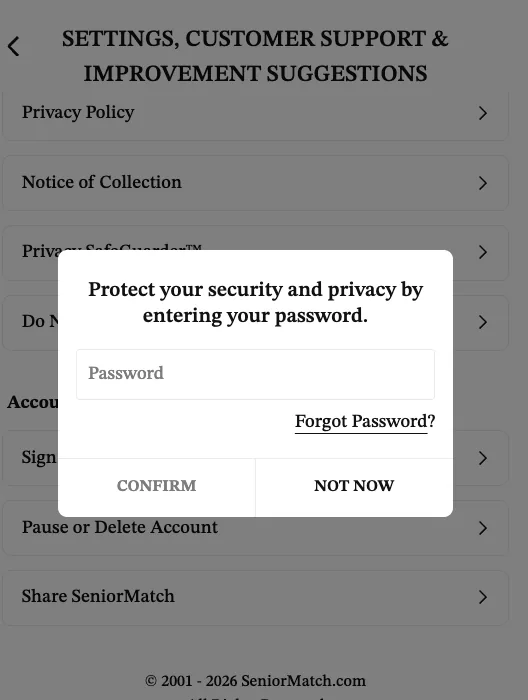
Deleting your account is not cancelling either, on two of the three routes. The FAQ is explicit: "When paying by Google Play or the Apple App Store, please note that you'll also have to stop your subscription through Google and / or Apple. If you do not, you will continue being charged regardless of your account status on the app." Pay by card on the website and the rule flips: removing your account cancels the subscription for you.
If the Subscriptions page will not do what you need, SeniorMatch lists 1-416-628-1072 and 1-888-702-1274 as numbers you can call to turn off auto-renewal, staffed 9 AM to 5 PM Eastern. There is also 24/7 live chat inside the account (SeniorMatch's own claim: replies within 30 seconds). We did not call or write, so we can vouch for the numbers being published, not for what happens when you ring them.
Referral codes add days, they do not cut the price
SeniorMatch promotes two codes on its own pages: 2026 on the pricing page and SM82 on the cost page. Neither is a discount. Both hand you extra Premium days once you have bought a qualifying plan, and the amount you are charged does not move.
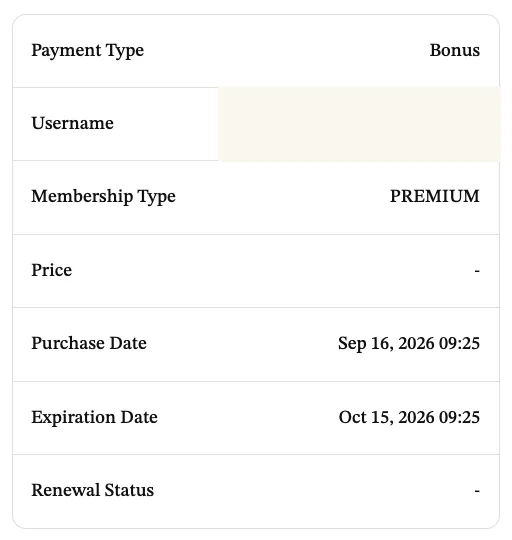
| One month, $33.99 | 7 extra days |
|---|---|
| Three months, $69.99 | 15 extra days |
| Six months, $109.99 | 50 extra days |
SeniorMatch says this itself, on its cost page: "It is not a traditional discount code and does not reduce the amount charged at checkout." So if you searched for a SeniorMatch promo code hoping to pay less than $33.99, the answer on 16 September 2026 was that no such code was on offer.
The code goes in an optional field at step 3 of registration, before you finish signing up. Members who already have an account are told to contact support before buying rather than expecting the field to appear later. We have not put a code through a purchase, so how many days actually land is SeniorMatch's claim rather than our measurement.
The same company charges $499.00 a month for the sister site
SuccessfulMatch.com, Inc. runs both SeniorMatch and SilverSingles, and from inside an account the two look like one product under two names: the same menu structure, the same FAQ wording, the same 3 business day refund clause, the same Widowed filter.
The prices are nothing like each other. Read from inside a SilverSingles account on 16 September 2026, its checkout showed $499.00 billed every month, or $999.00 for three months, against SeniorMatch's $33.99 and $69.99. SilverSingles lists 33 paid privileges; SeniorMatch lists 40. Its public pages show no price at all until you have registered.
Whatever you conclude about whether SeniorMatch is worth $33.99, it is worth knowing what the same owner charges for a near-identical product under another name. The full eight service comparison, prices and dates and all, is on senior dating sites compared.
Before you pay
Five things, in the order they will save you money.
- Search your own state on a free account first. Paying does not put people near you, and the free tier shows you the gallery without a card.
- Read the total on the final screen, not the weekly framing on the plan screen. The one month plan takes $33.99 at once.
- Decide before you click whether you will turn auto-renewal off the same day. If the honest answer is that you will forget, buy one month rather than six.
- Note the date on the confirmation email. That is when your 3 business days start.
- Remember where you paid. A charge through Apple or Google has to be stopped through Apple or Google, whatever you later do to your SeniorMatch account.
If the free search in your area came back thin, none of the above applies and the answer is no plan at all. If it came back with people you would drive to meet, one month is the sensible size of the bet.
Questions people ask
How much does senior match cost?
At checkout inside the account on 16 September 2026, $33.99 for one month, $69.99 for three months or $109.99 for six months. SeniorMatch's own public cost page listed the same three figures that day. The free Standard account costs nothing and does not expire.
How much is SeniorMatch per month?
One month is $33.99. Three months is $69.99 charged once, which works out at about $23.33 a month. Six months is $109.99 charged once, about $18.33 a month. Only the one month plan is billed every month; the other two are single payments taken up front.
How do I cancel a SeniorMatch subscription?
Cancel where you paid. On the website: Settings under your photo, then Subscriptions, then the link reading "Your membership will automatically renew until you cancel your subscription by clicking here", then CONTINUE MANAGEMENT. On an iPhone or iPad: the Settings app, your name, Subscriptions, the SeniorMatch entry, Cancel Subscription. If you bought through Google Play, stop it in Google Play. Deleting your SeniorMatch account does not stop a subscription bought through Apple or Google.
Is there a SeniorMatch promo code?
The two codes SeniorMatch promotes on its own pages, 2026 and SM82, add Premium days after a qualifying purchase rather than cutting the price. SeniorMatch's cost page says so in writing: "It is not a traditional discount code and does not reduce the amount charged at checkout." The code goes in the optional referral field at step 3 of registration.
Does SeniorMatch have a free trial?
There is no period of free Premium. The service agreement dated 12 May 2026 uses the phrase "Trial Period" for something else: the 3 business days after you subscribe in which you can cancel and get the money back. The free thing on SeniorMatch is the Standard account, which lets you register, search and reply to paying members for nothing.
Does SeniorMatch charge anything on top of the plan price?
The plan price is the only charge the web checkout showed us on 16 September 2026. SeniorMatch's public cost page adds that prices are in US dollars and that taxes may be applied depending on your country or region, so the final screen can read higher than the plan price. Buying inside the iPhone app puts the charge through Apple instead, which is a different billing relationship and a different cancel path.
How this page was checked, and what it could not check
Every price, date and rule above renders from a page we read on a date we recorded. The sources:
- Plan prices, the weekly display wording, the payment buttons and the Chairman screen: the checkout, renewal and payment screens inside a Premium account provided for this review, read 16 September 2026.
- The refund clause and the Trial Period wording: SeniorMatch's End User Service Agreement, last updated 12 May 2026, section 2.6.
- Auto-renewal, freezing, cancelling, statement descriptors and payment methods: the SeniorMatch FAQ, entries dated 23 April 2026 for payment and statements and 7 July 2025 for cancelling, read 16 September 2026.
- The public figures, the tax note and the referral code wording: SeniorMatch's cost page and pricing page, read 16 September 2026 and re-read 17 September 2026.
- The App Store listing prices and the one month gap: the SeniorMatch listing on apps.apple.com, read 17 September 2026, comparing the app's description text against its purchase flow.
- The older amounts: App Store and Trustpilot reviews, quoted short and unedited with the dates they were posted.
- SilverSingles prices and privileges: its logged-in checkout and privileges list, read 16 September 2026.
- The previous snapshot of $29.95, $59.95 and $95.95: this site's own record of the checkout on 5 September 2026.
What this page could not check. We bought no plan on this account, so we have not watched a renewal happen, timed a refund, or seen what a cancellation confirmation looks like. We did not call the support numbers. We did not read the Android in-app price, so the one dollar gap is an Apple finding only. Chairman shows no total and we did not apply for it. And prices move: the jump from $29.95 to $33.99 took eleven days, so read the screen in front of you on the day you decide rather than trusting this one.
If a figure here is wrong or has gone stale, email contact@seniormatchreview.com and we will fix it and date the fix.
What the free account includesReviews and complaintsCompare 8 senior dating servicesHow we test