What happens when SeniorMatch Premium ends?
The account stays open as a free one. Advanced filters lock, the list of who liked you closes, and you can still reply to Premium members but can no longer write first.
On this page 6 sections
How we know
Our test account had one month of Premium, provided by SeniorMatch for this review, with auto-renewal off. It ran out on 20 October 2026 and nothing renewed it. On 12 November 2026 we went through the account screen by screen.
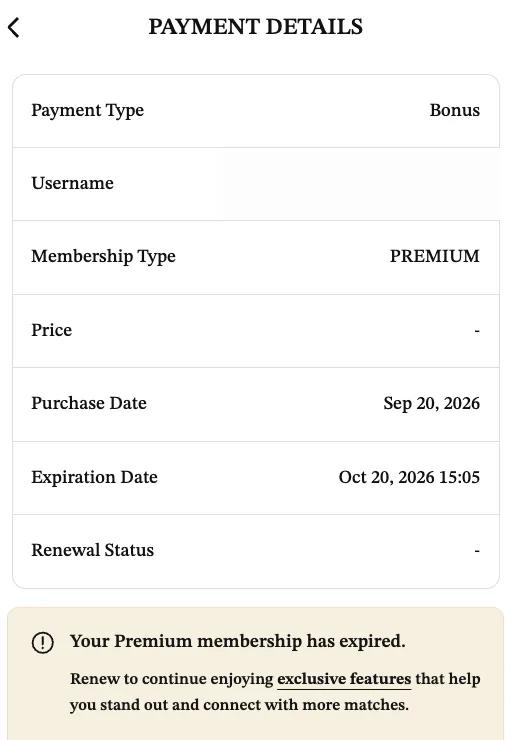
The Payment Details page still called the membership type Premium and the payment type Bonus. It gave the expiration date as 20 October 2026 at 15:05, and under the table it said: “Your Premium membership has expired.”
What closed
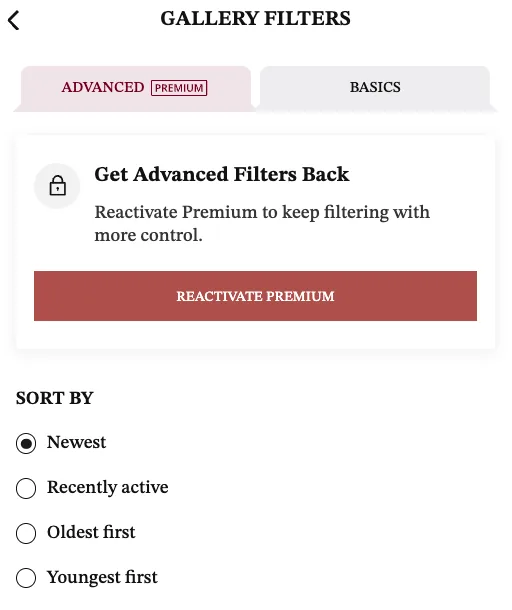
The advanced filters went first. While we were on Premium the panel carried a warning, “Advanced filters reset when your Premium membership expires.” Afterwards the Advanced tab opened on a lock, the heading “Get Advanced Filters Back” and the line “Reactivate Premium to keep filtering with more control.” The filters are still listed underneath, including distance and relationship status, but none of them can be set.
The Likes You tab in Contacts showed an Upgrade button where the list had been.
Searching several places at once is gone as well. The Basics tab marks “Search multiple locations” as Premium, with the note “Search up to 3 locations at once.”
A dark banner now runs across the top of most pages: “Unlock more premium connections with a subscription.”
What stayed
More than we expected.
The profile, its photo and its verification were untouched. The verification page still listed a verified profile photo and a verified email address.
Chats still opened and still listed the account’s conversations, with their unread counts. We did not open any of them.
Search by place still worked. With Specific location set to United States and Florida, the first 40 cards were all in Florida.
Hide my current location, the one privacy switch outside the Premium box, was still available.
The privacy settings did not behave as the notice says
SeniorMatch prints this at the foot of its privacy page: “Premium-only settings will be restored to default when your Premium Membership expires.”
On our account, 23 days after Premium ended, the Hide me from all members switch was still on and the account’s own badge still read “hidden”. We cannot see what other members saw. Read the page yourself after your Premium ends, whichever way you want it to be. There is more on hiding a profile.
What SeniorMatch says should happen
Its help answer on auto-renewal, dated 11 November 2026: “After you turn off your auto-renewal, you can still enjoy the privileges on our site as a premium MEMBER until your premium MEMBERSHIP ends. Afterwards, you’ll continue to enjoy the benefits of our standard membership.”
That matches what we saw. It also means turning auto-renewal off on the day you buy costs you nothing. You keep every paid day.
If it renews instead
Auto-renewal is on by default. If you did nothing, the plan bills again for the same length at the same price. To see the date it will happen, SeniorMatch’s answer dated 19 October 2026 points to Settings, then Payment Details. The steps to stop it are on how to cancel SeniorMatch.
Related questions
Does SeniorMatch delete my account when Premium expires?
No. Ours stayed open with its profile, photo and verification in place. SeniorMatch's help answer dated 11 November 2026 says that after Premium ends you continue on the standard membership.
Do I lose my SeniorMatch filters when Premium ends?
Yes. The advanced filters are a Premium feature and reset when Premium expires. On our account the Advanced tab opened on a lock and the words Get Advanced Filters Back.