Checked 16 September 2026
Is SeniorMatch free? What a free account can and cannot do
SeniorMatch is free to join, and the free account is a real one: build a profile, browse, search by country and state, send winks, and reply when a paying member writes to you. It will not let you start a conversation, filter by distance or hide your profile. Those three sit behind Premium, $33.99 for one month at checkout on 16 September 2026.

On this page 11 sections
Free and paid, line by line
We confirmed every line below either in the SeniorMatch FAQ entry "How do I use this site?", updated 20 August 2026, or by opening the feature inside the account.
| Create a profile and upload photos | Free: yes Premium: the same, up to 26 public and 26 private photos either way |
|---|---|
| Browse profiles and public photos | Free: yes Premium: the same |
| Search by country and state | Free: yes Premium: the same |
| Search by distance ("Near my location") | Free: no, the distance slider unlocks with Premium Premium: yes |
| Advanced filters: height, education, religion, children, relationship status and the rest | Free: no Premium: yes, and they reset when Premium expires |
| Send winks | Free: yes, 20 a day for the first three days, then 40 a day Premium: unlimited |
| Reply to a message a Premium member sent you | Free: yes Premium: yes |
| Start a conversation | Free: no Premium: yes |
| Keep a conversation open once the other person's Premium ends | Free: no Premium: yes, while you are the one paying |
| See who viewed or liked you | Free: no Premium: yes |
| Hide your profile, browse anonymously, hide your online status | Free: no Premium: yes |
| Voice and video calls | Free: no Premium: yes, with number masking |
| Ask for access to someone's private album | Free: yes, and the owner decides Premium: the same, paying does not unlock it |
| 24/7 live chat support | Free: no Premium: yes, one of the 40 privileges listed inside the account |
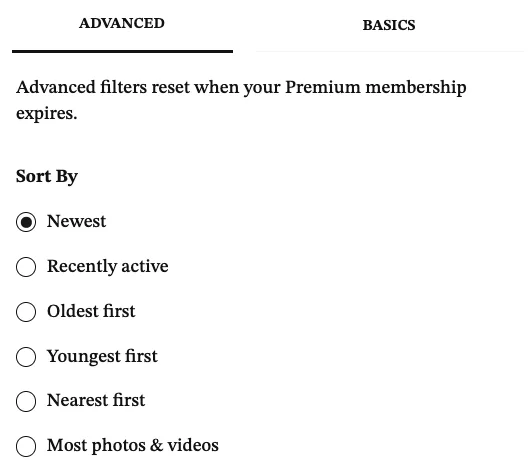
The filter panel is where most of the paid lines live. Distance search, the sort orders including "Nearest", and every filter beyond country and state sit behind Premium, and the panel says at the top that advanced filters reset when a Premium membership expires. Set them, let the plan lapse, and you are back to the defaults.
The one rule that matters
The SeniorMatch FAQ entry "I am a standard member. Can I initiate sending messages to others?", last updated 13 July 2026, answers: "No. As a Standard Member, you cannot initiate or continue conversations unless the other person currently has a PREMIUM MEMBERSHIP. You'll need to become a premium MEMBER to start new chats, and at least one person in a conversation must have an active PREMIUM MEMBERSHIP for messaging to remain available."
That rule has two consequences people miss. If you and someone you like are both free members, neither of you can write to the other, and winks are the only signal that travels in both directions. And if a Premium member writes to you, you reply free, and then their plan lapses, the conversation closes for both of you. App reviewers describe exactly that moment: "I can send a message but they can't read it unless I upgraded?" (SeniorMatch iOS review, 15 November 2019, one star).
So the free account is a viewing pass and an inbox: enough to find out whether anyone near you is active, not enough to date.
Prices as shown at checkout, 16 September 2026
| 1 month | $33.99 total shown as "$8.50 / week, billed as USD $33.99 every month" |
|---|---|
| 3 months | $69.99 charged once about $23.33 a month |
| 6 months | $109.99 charged once about $18.33 a month |
| Refund window | 3 business days service agreement, 2026-05-12 |
Those three figures are from the plan selection page inside a Premium account provided for this review on 16 September 2026. SeniorMatch's public pricing page and its public cost page showed the same three figures the same day. Prices are in US dollars, and the public page says taxes may be added by region. The payment methods listed in the FAQ entry dated 23 April 2026 are Visa, Mastercard, American Express, debit cards, CCBill, Google Pay, PayPal.
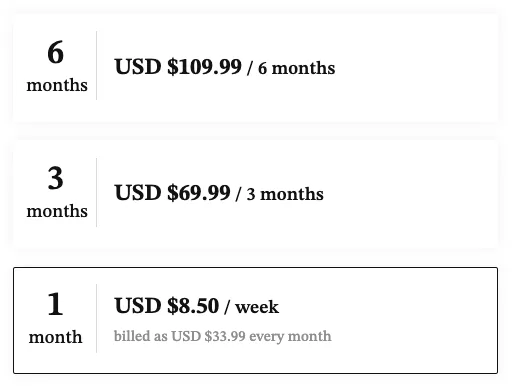
Two things to know before you hold these up against other reviews. Older reviews, and our own earlier snapshot from 5 September 2026, quote $29.95, $59.95 and $95.95; those were the figures on the public cost page in early September 2026 and they have since changed. And the "$8.50 / week, billed as USD $33.99 every month" line on the checkout page is the monthly plan divided by four. You are billed $33.99 a month, not $8.50 a week.
The account also advertises a separate "Chairman" tier, a limited time offer at $8.50 a week with a matchmaker and 55 privileges, by application only. SeniorMatch never showed this account its full price, so we do not print one.
Referral codes add days; they do not reduce the price
The public pricing page promotes referral code 2026 and the public cost page promotes code SM82. Both work the same way: put the code in the optional Referral Code field at registration step three, buy a plan, and get extra Premium days on top. The public page lists 7 extra days on a one month plan, 15 on three months and 50 on six. Neither code changes the amount charged. The cost page says so itself: the code "is not a traditional discount code and does not reduce the amount charged at checkout." The page tells existing members to ask support before buying, to check they are eligible.
If another site promises you a percentage off with a SeniorMatch code, treat it as unverified. Nothing inside the account showed a price reduction.
The refund window is 3 business days
The End User Service Agreement, last updated 12 May 2026, says: "you may cancel a subscription within three (3) business days of subscribing to our Service to receive a refund... This three business day period is your 'Trial Period'." It then says subscription fees are non-refundable except for cancellations inside that period. The FAQ is softer: support handles "full / prorated refund inquiries within a reasonable time frame," usually within one business day. The wording that binds you is the agreement's, and that is 3 business days.
Auto-renewal is on by default and renews "for the same package length at the same price until you cancel it." You turn it off under Settings, then Subscriptions. If you bought through the App Store or Google Play, deleting your SeniorMatch account does not stop the store subscription: the FAQ says you "will continue being charged regardless of your account status" until you cancel in the store. The steps are on the cost and renewal page.
How to use the free account to check your area before paying
- Register and set your state. The free search filters by country and state. Set both to where you live.
- Sort by what you can. The sort options, newest and recently active and nearest, sit under Advanced and are paid, so on a free account you are looking at the default order. Scroll a few screens.
- Count, do not browse. Note how many profiles in your state have a photo and were active recently. A green dot means online now; a green circle means online within three days. Decide in advance what number would make a month worth $33.99 to you.
- Send a few winks. Free members get 20 a day for the first three days. A wink back tells you someone is active. It does not open a conversation unless one of you pays.
- Watch your inbox for a week. Premium members can write to you and you can reply free. If nothing arrives and few local profiles are active, the free account has done its job: it told you not to pay.
Two cautions from inside the account. The Discover feed as we found it on 16 September 2026, with no location filter taking effect, returned 40 profile cards: 0 of them in the United States, and 27 of the 40 tagged "OPEN TO RELOCATING OR TRAVELING TO MEET." The next day, 17 September 2026, we set the filter to Living in: United States and the gallery answered "No members found," and it said the same again with the state cleared and only the country set. That is one account's feed on two days rather than a count of the membership, and it is exactly why you should look at your own state before you pay.
The second caution is on the advanced filters page itself: "We'll prioritize members who match your filters, but you may still receive messages from members outside your filters." Filtering narrows what you see, not who can contact you.
What reviewers say about the free tier
The public complaints about where the free line sits have read the same way for years. Dated examples, quoted short:
- Trustpilot, 13 February 2025, one star: "with no real value to the free trial, I had to upgrade to premium for 1 month at $30."
- App Store, 17 May 2020, one star: "won’t allow you to change anything unless you upgrade to premium membership."
- App Store, 1 March 2020, one star: "Communication features behind pay wall, not many members."
- App Store, 15 November 2019, one star: "I can send a message but they can't read it unless I upgraded?"
None of these contradicts the rules above. They are people finding out the rules after registering. A fuller, themed count of public complaints is on the reviews page.
The same company runs SilverSingles at a very different price
SilverSingles, owned by Spark Networks until 2026, now operates under SuccessfulMatch.com, Inc., the same Delaware company that runs SeniorMatch. Read from inside a SilverSingles account on 16 September 2026: the same site layout, the same FAQ text word for word, a 3 business day refund clause worded identically, a Widowed relationship status filter, 33 paid privileges against SeniorMatch's 40, and checkout prices of $499.00 for one month and $999.00 for three months. SilverSingles shows no price on its public pages at all; you see it only after registering. If you are choosing between the two on price, that is the comparison.
Bottom line
SeniorMatch is free to look at and free to answer. It costs $33.99 a month to speak first, and a conversation only stays open while somebody in it is paying. Use the free account to find out whether your area holds anyone worth $33.99 to you, then decide. If you do pay, turn auto-renewal off the same day and keep the 3 business day refund window in mind.
Questions people search for
Is senior match free
Registration, profile creation, photo uploads, browsing, searching by country and state, sending winks and replying to messages from paying members are free. Starting a conversation, keeping one open after the other person's subscription lapses, distance search, advanced filters, seeing who viewed or liked you, and hiding your profile are paid. That was the state of the site on 16 September 2026.
Does senior match cost money
Only if you buy a Premium plan. On the checkout page inside the account on 16 September 2026, the plans were $33.99 for one month, $69.99 for three months and $109.99 for six months, in US dollars. Holding a free account costs nothing, for as long as you want to hold it.
How much is senior match per month
$33.99 if you buy one month at a time. The checkout page shows that as "$8.50 / week, billed as USD $33.99 every month". Three months works out at about $23.33 a month and six months at about $18.33 a month, but both are charged upfront as a single payment.
Senior match free trial
Not in the sense of a free Premium period. The free account is the trial. The service agreement does give you a 3 business day window after subscribing in which you can cancel for a refund; after that, fees are non-refundable under the contract.
Senior match com free
The free side of seniormatch.com stops at the inbox. A free member can reply to a message a Premium member started. A free member cannot start a new conversation, and the SeniorMatch FAQ entry dated 13 July 2026 says "at least one person in a conversation must have an active PREMIUM MEMBERSHIP for messaging to remain available." Two free members cannot write to each other at all.
Seniormatch photos free
Yes. Public photos on a profile are visible to free members. Private albums need the owner's approval whatever your membership, so paying does not unlock someone else's private album.
Is senior match worth it
That depends on what the free view shows you in your own area, which is why you use the free account first. If the free search for your state shows active profiles at a distance you would actually travel, one month is a bounded test. If it does not, paying will not create people who are not there.
Senior match free login
Yes. You log in to a free account with the email and password you registered with. Nothing about logging in requires payment. Pages advertising a separate "free login" are search engine bait; the only login is at seniormatch.com.
Senior match referral code
The public pricing page lists code 2026 and the public cost page lists code SM82. Both add Premium days after you buy a plan: 7 extra days on one month, 15 on three, 50 on six. Neither reduces the amount charged, and both have to be entered during registration.
Senior match app free
The iOS and Android apps are free to download and give you the same free account features as the website. In-app purchases follow the same plans, and if you buy through the App Store or Google Play you have to cancel there too, because deleting the account does not stop a store subscription.
How this page was checked, and what it could not check
Every rule and number above came off a page we read on a dated day. Elena read them inside a Premium account provided for this review, 16 September to 15 October 2026. Inside the account we only read pages and moved filter controls: no winks, no likes, no messages, no profile edits.
- Plan selection (checkout) page, advanced filters, privileges list and settings, read inside the account on 16 September 2026.
- SeniorMatch Help and FAQ entries dated 13 July 2026 (standard member messaging), 20 August 2026 (how to use this site), 23 April 2026 (payment methods), 7 July 2025 (cancelling) and 26 December 2024 (winks per day).
- SeniorMatch End User Service Agreement, last updated 12 May 2026, "Subscription Renewal and Cancellation".
- SeniorMatch public pricing page and the public cost page, both read 16 September 2026.
- Discover feed sample of 40 cards, 16 September 2026, and the United States filter re-test, 17 September 2026.
- SilverSingles plan selection page, privileges list and service agreement, read inside a Silver Select account on 16 September 2026.
- Trustpilot and Apple App Store reviews, dates as shown, quoted short and unedited.
What this page could not check: we did not send messages to members, so we cannot report reply rates. We did not buy a plan on this account, so the refund window here is the contract's wording rather than a claim we have put through. We did not read the in-app prices on Android or iOS, which can differ from the web checkout. And the gallery numbers are one account's feed on two days, not a count of who is on SeniorMatch.
Prices move, so we re-check them monthly, and the date at the top of this page is the last time these figures were confirmed. Before you pay, confirm the price on seniormatch.com.
Related: SeniorMatch cost and renewal · SeniorMatch reviews · Free senior dating sites · Safety guide