Checked 16 September 2026
SeniorMatch safety: verification, reporting, blocking, and the scams reviewers describe
Every SeniorMatch member has to pass photo verification, a short selfie video, required of all members since 14 April 2025. It proves one thing: the face using the account matches the face in the photos. It does not check anyone's job, marital status, intentions or criminal record. SeniorMatch says so itself, in capitals, in its service agreement: "NO CRIMINAL BACKGROUND SCREENING". A verified badge means the photos are of a real person. Whether that person is who they say they are is still your job.

On this page 8 sections
If someone you have met on SeniorMatch has already asked you for money, skip to what to do first. None of this assumes you were careless. The people who run these approaches do it for a living, and they had run the same script many times before it reached you.
What SeniorMatch verification proves, and what it leaves open
Photo verification became compulsory for every SeniorMatch member on 14 April 2025. We can date it because the notice is still sitting in the account's inbox: a message from SUPPORT, dated 04/09/2025, headed "Coming Soon: Photo Verification Required Starting April 14, 2025".
The method is a video of your own face. SeniorMatch's FAQ entry "What does 'verify' mean?", last updated 25 February 2026, describes it as "proving your identity by uploading a selfie video (3-8 seconds)". A separate entry from 2 February 2025 says what the review actually compares: "We will review to ensure your selfie matches the person in your profile photos, and your verification will be confirmed or rejected within 24 hours." The FAQ entry on timing, updated 12 November 2025, says the process "typically takes one working day". The capture uses colored lights, and the FAQ carries a warning to be cautious if you are photosensitive.
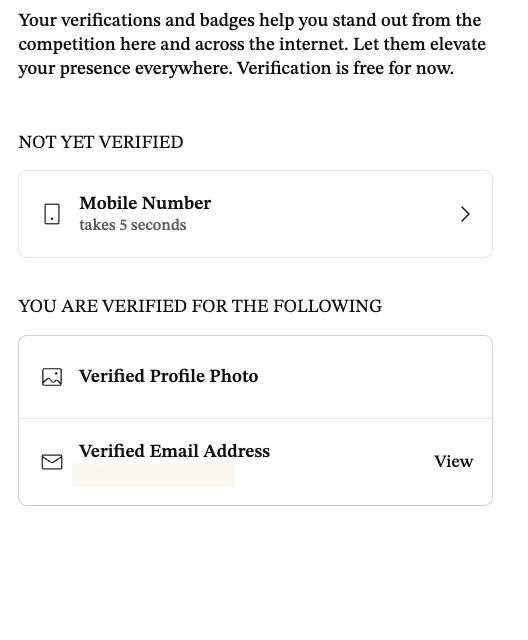
SeniorMatch is unusually direct about the limits. Its FAQ entry "What does photo verification confirm and what does it not confirm?", updated 28 July 2026, says verification "does not confirm a member's income, occupation, relationship intentions, medical information, criminal history, or the accuracy of every statement in their profile."
The service agreement goes further, under a heading set in capitals: "NO CRIMINAL BACKGROUND SCREENING". The clause beneath it reads: "You acknowledge and accept that the Company does not conduct any criminal background checks, background checks, or any other screening of its Members or any other users of its Services." The same section adds that SeniorMatch does "not represent, guarantee, or warrant the behavior, accuracy of information, or suitability of any Member". You can read both on the service agreement and the help and FAQ.
Two practical footnotes. Your verification is canceled if you delete all your public photos, which is worth knowing before you tidy up an album. And the verification video itself is sealed: the FAQ of 30 March 2026 says it "cannot be viewed or accessed by anyone, including yourself, after submission."
One optional extra sits on the same page. Mobile number verification is offered as a step that "takes 5 seconds", and the page carries the line "Verification is free for now." The account we read had a verified photo and a verified email address, and no verified phone number.
So the badge is worth something. Before 14 April 2025 it was possible to hold an unverified photo indefinitely, and reviewers noticed: one Trustpilot reviewer wrote on 13 February 2025, at one star, that they were "immediately deluged with winks and views that had unverified profile photos, no other photos, and little to no profile information." That complaint predates the rule. What the badge still cannot do is tell you that the widower in Ohio is a widower, or in Ohio.
The tools you actually have: report, block, hide
Reporting is a two-tap path and it works from either end of a conversation. SeniorMatch's FAQ entry "How do I report a profile?" gives it: "go to that profile and then click '...' in the upper right corner of the profile. Or you can report a specific profile on the message window by clicking '...' in the upper right corner. Then choose the reason you are reporting the profile and click Submit." The community guidelines repeat it in one line, "Go to the profile, tap '...' and choose Report", and add an address, support@SeniorMatch.com, for anything urgent.
Here is the part that belongs on the same page as the button. The service agreement says you may report, and then says this: "you agree that the Company is under no contractual or legal obligation to take any action whatsoever in response to the information you have provided the Company in any such Report." Report anyway. Just do not treat the report as the end of your own protection, and do not wait for an outcome before you also stop replying.
Blocking lives in the chat list rather than in settings. On the account we read on 16 September 2026, the menu beside a conversation offered "Pin to Top", "Hide (Block)" and "Hide Conversation". Settings then keeps three lists you can undo from: "Manage Hidden Users", "Members I've Hidden From Search" and "Hidden Conversations". SeniorMatch's own FAQ safety tips, updated 30 July 2025, put it the same way: "If you feel unsure or threatened by someone's behavior, stop communicating with them immediately. Visit their profiles and use the hide button to prevent any further contact."
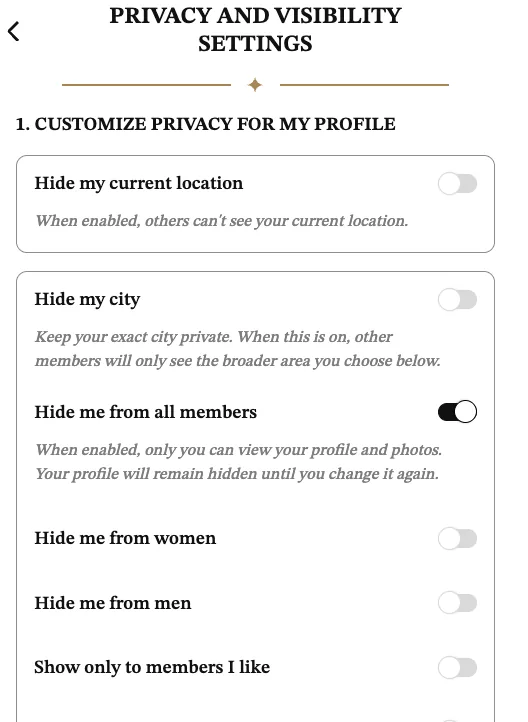
The visibility switches sit on one page, Privacy and Visibility. Reading down it on 16 September 2026: hide my current location, hide my city, hide me from all members, hide me from women, hide me from men, show only to members I like, show my profile to members I like or paying members, and a region control offering "All regions", "My country only" or "Selected regions". Below those: browse profiles anonymously, hide my online status, and hide my activities in "Moments".
If you only want to hear from people who could actually drive to you, the two switches that matter are "Show me to members in: My country only" on this page, and Enable Global Visibility in Settings, described there as: "When this is on, you and members in other countries with Global Visibility enabled can see each other." Turning Global Visibility off narrows who can see you across borders. Neither switch stops a message that is already in your inbox.
Two more controls live in Settings. Prevent Incoming Video and Voice Calls stops other members starting a call with you, which SeniorMatch confirms from the other direction in its FAQ of 14 September 2026: if someone cannot see your voice call button, that switch is on. And Two-Factor Authentication, which was showing "Off" on the account we read. Turning it on protects your account from someone else, which is a different problem from the one this page is mostly about, and worth ten seconds anyway.
Now the catch, printed by SeniorMatch at the foot of the privacy page: "Premium-only settings will be restored to default when your Premium Membership expires." The 40 Premium privileges list bears this out. Under its "Take control" heading it names "Hide Certain Profiles from Search", "Browse Profiles Anonymously", "Choose Who Sees You" and "On-Demand Invisibility". So some of the privacy you set up while paying is on loan. If you let Premium lapse, go back to this page and read it again rather than assuming your settings survived.
The page also mentions a lighter option than deleting: "You can pause your account to hide your profile and photos from others without deleting your account."
The shapes that keep coming back in reviews
We read the public review record for what it says about safety rather than about value, and set the two apart on purpose: "I did not get my money's worth" and "someone tried to take my money" are different complaints. Four shapes recur. Every quote below carries its date and its star rating.
One photo, and almost nothing written underneath. This is the most common description in the reviews we read. A Trustpilot reviewer on 13 February 2025, at one star: "I was immediately deluged with winks and views that had unverified profile photos, no other photos, and little to no profile information." Another Trustpilot reviewer, on 13 September 2026, also one star, opened on the approach itself: "First someone try to scam me, but I didn't fall for it. Many profiles have very little info."
The match is a long way away, and says so on the card. Henrietta Carey, Trustpilot, 5 September 2025, one star: "I’m getting matches from all over the world!!! You can tell they’re not real. Some are CCTV stills of people." Our own reading matched the complaint. On 16 September 2026 we counted the first 40 profiles in the Discover feed as we found it, with no location filter taking effect, on a 63-year-old woman's account: 0 were in the United States, and 27 of the 40 carried the card tag "OPEN TO RELOCATING OR TRAVELING TO MEET". Median age was 52; 6 of the 40 were 65 or over.
That tag is not proof of anything by itself. Plenty of people over 50 really would move for the right person. It matters because of what it combines with: a profile several time zones away, a willingness to travel that never produces a visit, and a story that eventually needs your help to fund the trip.
Nobody local, whatever you set the filter to. Susan Lynne Deketeleare Merril, Trustpilot, 12 February 2026, one star: "Total scam dating site. Get messages anywhere accept local. Believe these are nothing but fake profiles. Don’t waste your money." We retested this on 17 September 2026 by setting the location filter to Country: United States, State: California, and applying it. The feed answered "No members found. Try broadening your search filters to explore more options!" Setting the state back to no preference and leaving only Country: United States returned the same sentence. That was one account, seeking men, on one day, and we reloaded to rule out a stuck screen. It is on this page because the filter result and the reviewers agree with each other.
The push to leave the platform. SeniorMatch names this one itself, on its general safety tips page: "Keep your communications on the platform to benefit from its security measures. Moving quickly to text or email can put you at risk of bypassing the site's protection." We should be straight about our evidence here. Our dated review sample gave us no quote naming a specific messaging app, so we are citing SeniorMatch's own warning rather than a reviewer's, and the reason to take it seriously is mechanical rather than anecdotal: once the conversation is in your text messages, the report button is no longer attached to it.
One more line from the same safety page is worth keeping in view, because it names the combination rather than any single sign: "Be wary of people who claim to be from your country but are supposedly stranded or in urgent need of money. Anyone unwilling to meet in person or talk via phone / video calls may not be trustworthy."
The numbers, with their years attached
These figures get quoted loosely and often blended. Each one below is labeled with the year of the data, the agency that published it, and what it counts.
The Federal Trade Commission's report Protecting Older Consumers, 2024-2025, published on 1 December 2025, states: "Reported losses from people 60 and older totaled nearly $2.4 billion, up from about $1.9 billion in 2023." That covers fraud of every kind, not romance alone. The same report also carries a much larger figure, between $10.1 billion and $81.5 billion, which is the FTC's estimate of the full cost once underreporting is modeled. That one is a model, not a count, and the two should never be quoted as if they were the same thing.
For romance specifically among older adults, the cleanest count is the FBI's. The 2024 Internet Crime Report from the Internet Crime Complaint Center, published 23 April 2025, lists 7,626 confidence and romance fraud complaints from people aged 60 and over, with losses of $389,312,356. Across all crime types, the same report logs 147,127 complaints from that age group, with $4.885 billion in losses, and describes the group in one line: "As a group, those over the age of 60 suffered the most losses and submitted the most complaints."
The most recent clean romance-scam pair from the FTC is a year older and covers all ages. Its February 2024 post reports full-year 2023 data: "reported losses to romance scams total $1.14 billion, with median losses per person of $2,000". The FTC adds in the same sentence that this was the highest reported loss total of any imposter scam that year. Read the median rather than the total. Half the people who reported lost less than $2,000, which is nearer the sum most readers of this page would actually be asked for.
AARP surveyed 300 adults aged 50 and over who were using, or had recently used, an online dating platform. On the page as we read it on 17 September 2026: "In our survey, 41 percent of users said they encountered a fake profile or a person trying to scam them." AARP also compared paid and free services, and we are quoting its wording exactly because the phrasing has been widely mangled: respondents "who relied only on free platforms were about 10 percent more likely to report encountering fake profiles or receiving unsolicited sexually explicit messages." AARP does not publish the two underlying rates, so that is a relative comparison, not a gap of ten points.
Every number on this page counts reports. AARP's page notes that more than half of romance-scam incidents go unreported. Treat all of these as floors.
SeniorMatch's position on the money question is short and, to its credit, the first item on its safety page: "Avoid sharing financial details or sending money under any circumstances. Scammers often prey on people by fabricating emergencies. Transactions, especially wire transfers or via apps, are difficult to reverse."
If money already moved, do these four things in this order
Speed is the only advantage you have left, and it is a real one. Some payments can still be stopped or clawed back in the first hours. That is the whole reason for the order below.
- Your bank, card issuer, or the app you paid through. First, and today. The FTC's consumer guidance is blunt about this: "If you paid a romance scammer with a gift card, wire transfer, credit or debit card, or cryptocurrency, contact the company or your bank right away. Tell them you paid a scammer and ask them to refund your money." If it was a gift card, call the card's own issuer as well as your bank, and keep the card and the receipt. If it was a wire, ask specifically about a recall.
- The FTC, at reportfraud.ftc.gov. This is the federal complaint desk, and the FTC's romance-scam page points to it by name. Your report feeds the same database that produced the figures above, which is part of how the next person gets a warning.
- The FBI, at ic3.gov. The Internet Crime Complaint Center is where the money-movement detail goes: account numbers, wallet addresses, the dates and amounts. We checked this link and the one above on 17 September 2026 and both resolved.
- SeniorMatch. Open the profile or the chat, tap "...", choose Report, pick a reason and submit, then email support@SeniorMatch.com with the same detail. This is last in the order because it is the step with no obligation attached to it, not because it does not matter.
Three things to do while you are at it. Keep the conversation instead of deleting it; screenshots of the profile, the messages and the payment are what every one of those four bodies will ask for. Tell one person you trust today, because the isolation is part of how these approaches work and the shame is the thing that keeps them going. And expect a second approach. The FTC keeps a page for it, Refund and Recovery Scams, which opens: "They're the worst of the worst: scams that target people who have already lost money to a scam." Its rule is one line long: "Never pay upfront for a refund or help with a refund."
SeniorMatch's safety page ends on a sentence we will just repeat: "Remember, if you are the victim of a crime, you are not to blame."
Red flags when dating in your 50s and 60s, and a checklist for the first meeting
None of the five below proves that anyone is lying. Each is a reason to slow down and check, and it is the combination that does the work. Two or three at once, and the pace itself is the warning.
| Love talk in week one | Declarations of love, a shared future, or a pet name before you have heard the person speak aloud once. What to do: say your own pace out loud, then watch whether it is respected. |
|---|---|
| No live call, ever | A camera that is always broken, a work site with no signal, a call that keeps being moved to next week. What to do: ask for a short video call. A photo album proves nothing on its own. |
| The location will not sit still | A profile that says one place, messages that say another, and a trip abroad that keeps being extended. What to do: ask plainly where they are today, and compare the answer with the profile. |
| Pressure to move to another app | A push to switch to text or email inside a few messages, sometimes framed as proof that you trust them. What to do: stay in the chat window until you would hand out your phone number anyway. |
| Money, gift cards, or account access | An invented emergency, a request for bank details, unasked-for financial advice, or a request to receive and pass on money. What to do: send nothing, keep the messages, report the profile. |
SeniorMatch's own FAQ, in an entry updated 20 July 2026 titled "How can I avoid being scammed or misled when dating online?", lands on the first of these before anything else: "Be careful if someone says things like 'I've been looking for you my whole life' very early, makes intense promises, or tries to create a strong emotional connection before you truly know each other." The same entry says to "look for consistency between what someone says and how they behave", which is the practical version of the whole list.
On the live call: ask for one, early, and keep it short. If you want it on the platform rather than by phone, SeniorMatch's voice and video calls run inside the account, and its FAQ of 14 September 2026 notes that the call button only appears if the other person has not switched Prevent Incoming Video and Voice Calls on. A refusal on its own can be shyness, or a bad connection. A refusal plus a story that keeps moving is enough to stop.
When you do decide to meet, the checklist is short.
- A busy public place, in daylight, that you chose.
- Your own transport, there and back. SeniorMatch's safety page is firm on this one: "You should not agree to be picked up at your home."
- One friend or family member who knows where you are going, who you are meeting, and when you expect to be home.
- A short first meeting, with something afterwards that gives you an honest reason to leave.
- Your own drink, kept with you, and your bag where you can see it.
- Permission, from yourself, to leave the moment it feels wrong, without explaining yourself well or at all.
Keep your home address, your last name, your workplace and your daily routine out of the profile and out of the first conversations. That is SeniorMatch's advice too, and it costs you nothing: "Do not share your last name, home address, phone number, email, or place of work in your profile or initial communications until you feel comfortable with the other person."
One last thing, and it is the part most readers find hardest. A good, ordinary person will not be offended by any of this, because they will be doing a version of it themselves. Someone who treats your caution as an insult has just told you something you needed to know.
Questions people ask
Is SeniorMatch safe?
SeniorMatch has required photo verification of every member since 14 April 2025, and it gives you a report button, a block control, and a page of visibility switches. It also states in its service agreement, in capitals, "NO CRIMINAL BACKGROUND SCREENING", and its FAQ of 28 July 2026 says verification does not confirm a member's income, occupation, relationship intentions, medical information or criminal history. So the account you are talking to belongs to the face in the photos. Everything past that is yours to check.
Are senior dating sites safe?
They are as safe as the checking you do inside them, and the reporting figures say older adults are worth checking carefully. The FTC reported that people 60 and older lost nearly $2.4 billion to fraud of all kinds in 2024. AARP, surveying 300 adults aged 50 and over in 2025, found 41 percent said they met a fake profile or someone trying to scam them. Both numbers count people who reported, which is a floor rather than a total.
How to spot a romance scammer
By pace and by direction, not by the photo. The recurring shape is fast affection, no live video call, a location that keeps shifting, a push to leave the platform early, and then a request for money. SeniorMatch's own FAQ, updated 20 July 2026, flags the first of these: be careful if someone says things like "I've been looking for you my whole life" very early. Any one of them can have an innocent explanation. Two or three at once is your cue to slow down.
Romance scams targeting seniors
The FBI's Internet Crime Complaint Center logged 7,626 confidence and romance fraud complaints from people aged 60 and over in 2024, with reported losses of $389,312,356. That is the count of people who filed a complaint with one federal agency in one year, so the real number is higher. AARP put it plainly on the page we read on 17 September 2026: more than half of the incidents people described to it were never reported at all.
Is online dating safe for seniors?
Safe enough to be worth doing, with two habits. Keep the first stretch of every conversation inside the platform, where a report button exists. And never let a new contact reach your bank, your card, or your gift cards, which is what SeniorMatch's own safety page asks for first: "Avoid sharing financial details or sending money under any circumstances." The meeting itself is the easier part to make safe: a busy public place, your own transport, and a friend who knows where you are.
Senior dating scams
In the public reviews we read for this page, they start with a thin profile: one photo, almost no written answers, and a first message that arrives fast. In the Discover feed as we found it on 16 September 2026, with no location filter taking effect, none of the 40 profiles shown was in the United States and 27 were tagged open to relocating, which is the shape reviewers describe when they say the matches are nowhere near them. The ask for money usually comes later, after several weeks of ordinary conversation.
How this page was checked, and what it could not check
Everything attributed to SeniorMatch was read on 16 September 2026, from inside a Premium account provided for this review, with a re-test of the location filter on 17 September 2026. We looked, we did not act: no messages were sent, no member was reported, and no profile was blocked.
That is the boundary worth stating plainly. Because we filed no report, we have nothing to tell you about how quickly SeniorMatch responds to one, or what it does with it. The clause we quoted from the service agreement is what the contract promises, which is not the same as what the safety team does. If you have reported a profile there and something happened, we would like to hear about it.
The Discover feed counts come from one account, one gender preference and one day, and the location control was not filtering the feed when we took them. They are a sample, not a census, and we have said so wherever the numbers appear. The public-review quotes are byte-exact and carry their dates and star ratings, but reviews are self-selected: people who have a bad experience write more often than people who have an ordinary one.
Sources
- SeniorMatch verification page, privacy and visibility settings, settings menu, chat list and Premium privileges list, read inside an account on 16 September 2026. Location filter re-test 17 September 2026.
- SeniorMatch help and FAQ, entries dated 2 February 2025, 30 July 2025, 12 November 2025, 25 February 2026, 30 March 2026, 28 May 2026, 20 July 2026, 28 July 2026 and 14 September 2026. Read 16 September 2026.
- SeniorMatch end user service agreement, dated 12 May 2026, section headed "NO CRIMINAL BACKGROUND SCREENING". Read 16 September 2026.
- SeniorMatch online dating general safety tips and community guidelines. Read 16 September 2026; both URLs re-checked 17 September 2026.
- Federal Trade Commission, Protecting Older Consumers, 2024-2025, published 1 December 2025. 2024 data. Checked 17 September 2026.
- FBI Internet Crime Complaint Center, 2024 Internet Crime Report, published 23 April 2025. 2024 data. Checked 17 September 2026.
- Federal Trade Commission, "Love Stinks, when a scammer is involved", February 2024. 2023 data. Checked 17 September 2026.
- Federal Trade Commission, What to know about romance scams, for the payment-recall wording. Checked 17 September 2026.
- AARP, The Best Dating Sites for Seniors Compared, page updated 24 August 2026, reporting its 2025 survey of 300 adults aged 50 and over. Checked 17 September 2026.
- Trustpilot reviews of seniormatch.com, quoted byte-exact with the date and star rating shown on each review. Captured 16 and 17 September 2026.
Related reading on this site: what the public review record says, what a free account can and cannot do, and how we test.