How do I delete my SeniorMatch account?
Open Settings, choose Pause or Delete Account and confirm with your password. If you subscribed through Apple or Google, cancel there first, because deleting the account does not stop that billing.
On this page 4 sections
Stop the billing before anything else
Order matters here, and it is the opposite of what feels natural. If you ever bought Premium inside the iPhone or Android app, end that subscription first and delete the account second.
SeniorMatch’s help page puts it this way: “When paying by Google Play or the Apple App Store, please note that you’ll also have to stop your subscription through Google and / or Apple. If you do not, you will continue being charged regardless of your account status on the app.” The same answer covers the other case: “If paying by credit card, we’ll automatically cancel your subscription for you if you remove your account.”
On an iPhone or iPad the steps are in SeniorMatch’s own help: open the Settings app, tap your name, tap Subscriptions, tap the SeniorMatch subscription, tap Cancel Subscription. If there is no Cancel button, or you see an expiry message in red, it is already cancelled. For Google Play the help page only says the cancellation has to happen through Google.
The steps on the website
SeniorMatch’s answer on deleting a profile, dated 13 October 2026, sends you to Settings under your main photo, then to My Account, where you give your password and follow the link reading “Click here to deactivate or delete your account”.
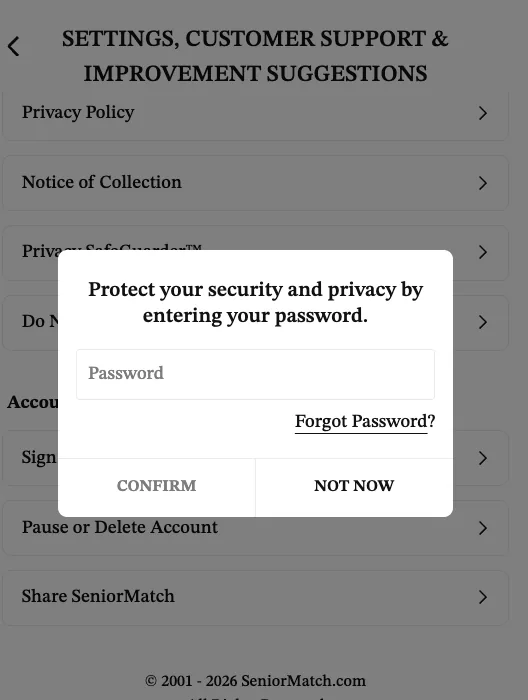
On our account on 12 November 2026 the wording was a little different. The Settings page ends with a group called Account Management, and the line there reads Pause or Delete Account. Choosing it opens a box that says “Protect your security and privacy by entering your password”, with two buttons, Confirm and Not Now. That is as far as we went.
What deleting removes, and what it keeps
After deletion, in SeniorMatch’s words, “your profile will be removed from the site and your profile will no longer be viewable.” It is not gone yet. For six months, logging in restores it. Only after six months without a login is your information “permanently deleted from our database”, and even then with one exception the help page names: “your success stories and other information that you posted in the common community.”
So if you mean it, do not sign in again to check. That one login undoes the deletion.
Pausing instead
The Privacy and Visibility page offers something smaller: “You can pause your account to hide your profile and photos from others without deleting your account.” It sits behind the same password prompt.
Pausing the account does not pause what you pay. SeniorMatch’s answer dated 15 October 2026 says “At present, we do not allow freezing of your premium MEMBERSHIP.” If you are on Premium and want a break, turn auto-renewal off and let the paid period run out.
Related questions
Can I get my SeniorMatch account back after deleting it?
Yes, for six months. SeniorMatch's help answer dated 13 October 2026 says that if you log in again within six months the account is automatically restored. After six months without a login the information is permanently deleted.
Does deleting my SeniorMatch account cancel Premium?
Only if you paid by card on the website. SeniorMatch says it cancels a card subscription for you when you remove the account. A subscription bought through the App Store or Google Play carries on until you stop it there.