Is it safe to pay on SeniorMatch?
Paying SeniorMatch is an ordinary card or PayPal purchase from a company that has run since 2001. The thing to watch is not the payment. It is the automatic renewal, which is on by default.
On this page 7 sections
Who you are paying
The site is run by SuccessfulMatch.com, Inc., a Delaware company. Its pages carry a copyright line that starts in 2001, and its upgrade screen says it was founded that year in Silicon Valley. You are paying an established business, not a stranger.
How you can pay
SeniorMatch’s help answer on payment, dated 23 April 2026, lists five ways:
- Credit card: Visa, Mastercard or American Express.
- A Visa or Mastercard check card.
- CCBill.
- Google Pay.
- PayPal.
If you would rather not hand a card number to a dating site, PayPal and Google Pay keep the number with a company you already use. That is a preference, not a warning. We have no evidence of a problem with card payments here.
If you subscribe inside the iPhone or Android app, Apple or Google takes the payment and SeniorMatch’s rules on cancelling change. More on that below.
What appears on your statement
The same help answer says a card, Google Pay or PayPal charge appears as “SeniorMatch”. A CCBill payment appears as “CCBill.com *SuccessMatch”.
The plain name is worth knowing if you share an account or a statement with family. SeniorMatch does not disguise it.
The part that catches people
Every plan renews on its own. SeniorMatch’s help answer dated 11 November 2026 puts it this way: “your subscription will be renewed for the same package length at the same price until you cancel it.”
Of the 59 low public reviews we read in September, 15 describe a charge, a refund or a renewal.
You can switch it off on the day you buy and keep everything you paid for. The same help answer says the privileges continue until the paid period ends.
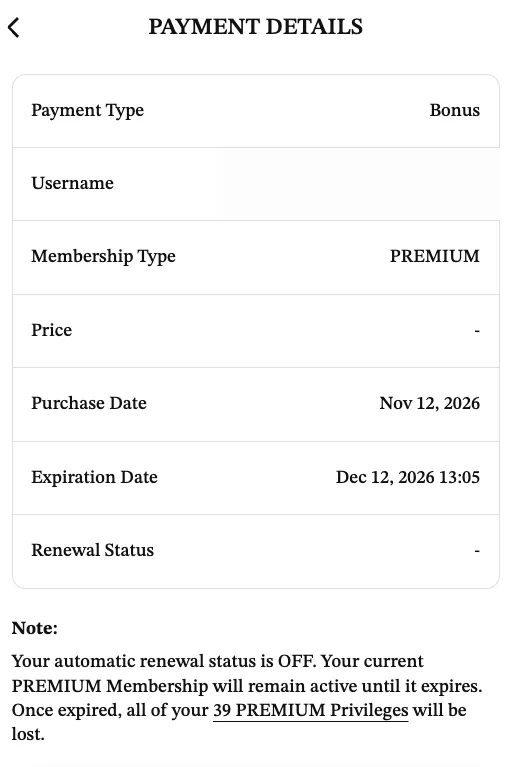
Payment Details, under Settings, is where you check. On our account it shows the expiration date and the line “Your automatic renewal status is OFF.”
If you paid through Apple or Google
SeniorMatch cannot cancel an app store subscription for you. Its help page says that if you paid through Google Play or the Apple App Store, “you’ll also have to stop your subscription through Google and / or Apple. If you do not, you will continue being charged regardless of your account status on the app.”
Deleting your SeniorMatch account does not stop an app store charge. Cancel in the store first.
If something goes wrong
The service agreement gives a refund if you cancel within 3 business days of subscribing. After that, SeniorMatch asks you to contact it before disputing a charge with your bank. Its phone lines are 1-416-628-1072 and 1-888-702-1274, 9 AM to 5 PM Eastern.
What payment does not protect you from
Other members. Paying SeniorMatch is safe in the ordinary sense. Sending money to someone you met there is a different matter, and no payment page can help with it. Its own safety tips say never to give out bank details and to report anyone who asks.
Related questions
What will a SeniorMatch charge look like on my card statement?
SeniorMatch's help answer dated 23 April 2026 says card, Google Pay and PayPal charges appear as SeniorMatch, and CCBill payments appear as CCBill.com *SuccessMatch.
Can I pay SeniorMatch with PayPal?
Yes. PayPal is on the list of accepted methods in the help answer dated 23 April 2026, with Google Pay and CCBill.
Will SeniorMatch ever email me asking for my password?
No. Its help answer dated 24 October 2026 says SeniorMatch will never send emails asking for personal or account information, and asks members to forward suspicious emails to its support address.
Look at your own area before you pay
A free account shows you who is in your state. Premium is $33.99 for one month if what you see is worth writing to.
Start with a free profileFree to join. We earn a commission when you register through our links; it does not change your price. The Premium membership on our test account was provided for this review, not purchased. Full disclosure
Skip it if you need distance search on day one, or if you know you will not turn off auto-renewal.
- Build a profile and add photos
- Search by country and state
- Send 40 winks a day after the first three days
- Reply when a Premium member writes first
- No card needed to register