Does SeniorMatch renew automatically?
Yes. Every SeniorMatch plan renews for the same length at the same price until you turn renewal off. You can turn it off the day you buy and still keep Premium until the paid period ends.
On this page 6 sections
The rule, in SeniorMatch’s words
From its help answer dated 11 November 2026: “In order for you to spend more time finding your match and less time paying bills, your subscription will be renewed for the same package length at the same price until you cancel it.”
Two things follow from that sentence.
Renewal is the default. You do not opt in.
The renewal copies the plan. One month at $33.99 becomes another $33.99 a month later. Six months at $109.99 becomes another $109.99 six months later. It does not step down to a single month.
Where the switch is
The same answer gives the path: click Settings under your main photo, then Payment Details, then the link that begins “Your membership will automatically renew until you cancel”. It adds that you can also email or call 1-416-628-1072 or 1-888-702-1274 and ask them to do it.
Payment Details is also where you see the date. On our account it lists the membership type, the purchase date and the expiration date to the minute.
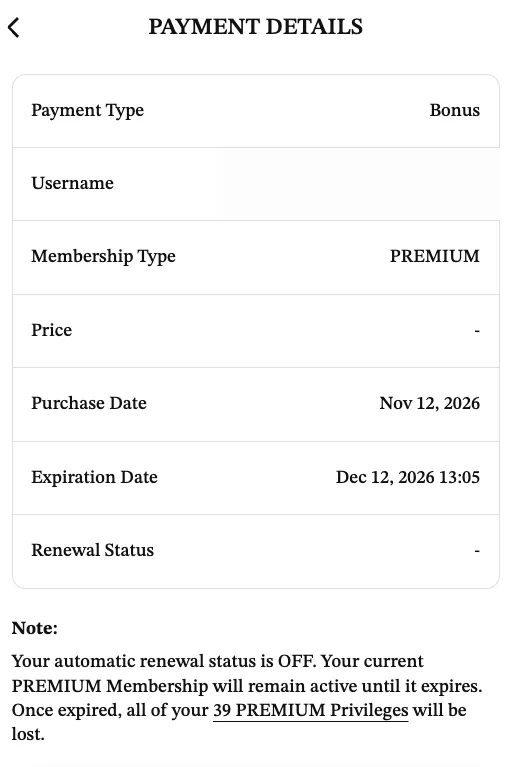
Ours reads: “Your automatic renewal status is OFF. Your current PREMIUM Membership will remain active until it expires. Once expired, all of your 39 PREMIUM Privileges will be lost.”
Turn it off on day one
There is no cost to switching renewal off early. The help answer says: “After you turn off your auto-renewal, you can still enjoy the privileges on our site as a premium MEMBER until your premium MEMBERSHIP ends.”
We have seen the second half of that for ourselves. Our first Premium month had renewal off. On 20 October 2026 it ended, nothing was charged, and the account carried on as a free one.
So the safe order is: buy, open Payment Details, turn renewal off, then go and use the site. If the month goes well you can buy again. Buying again is one click. Getting a renewal charge back after the refund window is not.
The app store exception
If you subscribed inside the iPhone or Android app, the switch in SeniorMatch’s settings is not the one that counts. Apple or Google holds the subscription.
SeniorMatch’s help page is blunt about it: “you’ll also have to stop your subscription through Google and / or Apple. If you do not, you will continue being charged regardless of your account status on the app.”
On an iPhone that means the Settings app, your name, Subscriptions. On Android it means the Play Store’s subscriptions page. Deleting the SeniorMatch app or your SeniorMatch account does not cancel either.
If it has already renewed
Check the date. The service agreement’s refund window is 3 business days from when a subscription is created, and we would ask on that basis the same day you notice. SeniorMatch’s phone lines are open 9 AM to 5 PM Eastern.
Then turn renewal off so it cannot happen a third time. You will keep the period you were just charged for.
Why this page exists
Of the 59 low public reviews we read in September, 15 were about a charge, a refund or a renewal. The rule is not hidden, but it is three clicks deep and it is on by default. Knowing where the switch is before you pay removes most of what those reviewers were angry about.
Related questions
How do I stop SeniorMatch from charging me again?
Open Settings, then Payment Details, and use the link that says your membership will automatically renew until you cancel. If you paid through the App Store or Google Play, cancel the subscription there.
If I turn off auto-renewal, do I lose Premium straight away?
No. SeniorMatch's help answer dated 11 November 2026 says you keep the privileges until your Premium membership ends, then continue as a standard member.
How do I check when my SeniorMatch subscription renews?
SeniorMatch's help answer dated 19 October 2026 says to open Settings and select Payment Details, which shows the expiration date.